We launched a new site recently and within days got a scary alert in Google Search Console: "Possible phishing detected on user login." Chrome was showing a full-screen warning to anyone who visited. Not a great look for a brand new site.
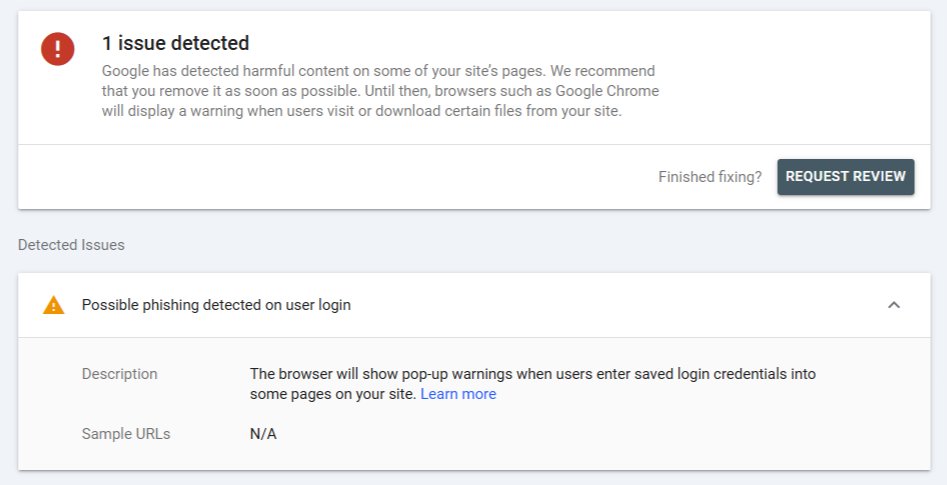
The exact Search Console warning — no sample URLs, no date, just a big red 1 issue detected.
I went through the usual checklist — scanned every PHP file for injected malware, checked the .htaccess for dodgy redirects, ran the domain through VirusTotal. Everything was completely clean. No prior domain history in the Wayback Machine either. We were stumped.
Then I remembered what I did during setup
While building the site, before the SSL certificate was fully installed, I opened Chrome to quickly check how the login page looked. Chrome threw up its big red warning screen — "Your connection is not private" — which it always does for HTTP pages that have password fields. I knew it was my own site, so I clicked the small "Advanced" link at the bottom and then "Proceed to site (unsafe)" to get through.
That's it. That one click is what did it.
That click gets reported back to Google's Safe Browsing system. From Google's perspective: a brand new .xyz domain, a login form, no established trust history, and a user who had to manually override a browser safety warning to access it. Their heuristics flagged it as a potential phishing page.
What to do if this happens to you
- First, verify the flag is real at Google's Safe Browsing checker.
- Go to Google Search Console → Security Issues. It'll show what was flagged and let you request a manual review.
- Make sure your SSL certificate is fully installed and your site is running on
https://everywhere. - If you haven't already, add a reCAPTCHA to your login/register forms — it signals to Google that you're protecting users, not harvesting credentials.
- Hit the Request Review button in Search Console and explain that it's a new legitimate site. A human will look at it.
The review typically takes 3–7 days. Once cleared, the Chrome warning disappears automatically and it leaves no permanent mark on your site's SEO.
Why does clicking "proceed anyway" matter?
Chrome's Safe Browsing is partly crowdsourced. When users override warnings to visit a page, those signals feed into Google's threat model. Normally this helps catch real phishing sites where legitimate users are being tricked past warnings. In this case, I was the only "user" — but the system doesn't know that.
New domains on less common TLDs like .xyz start with zero trust history, so they get much less benefit of the doubt than an established .com would.
Hopefully this saves someone the same headache. It's one of those things that feels obvious in hindsight but is very easy to do when you're just quickly checking your work during a late-night setup session.